OG Image Generator API: Social Cards From a Title
Published: · APIs in this article: Social Image Generator
When someone shares your link on X, LinkedIn, Slack or Facebook, the preview image decides whether anyone clicks. Most sites either have no og:image at all or use one generic logo for every page. Designing an image per blog post doesn't scale. Building your own generator means a headless browser, a framework-specific image function, or a canvas library plus font files.
This guide shows a simpler path: the APIBox OG Image API turns a title, subtitle and site name into a 1200×630 PNG with one request. We'll cover:
- Generating an image and the parameters that matter.
- Themes, colours and sizes for other networks.
- Wiring it into a static site build, without exposing your API key.
- Limits to know before you rely on it.
Setup
Create a free APIBox account and an API key. The Free plan has 1,000 requests a month and no card is needed.
export APIBOX_KEY="your_key"1. Your first image
curl -s -G https://apibox.io.vn/v1/og-image \
  -H "Authorization: Bearer $APIBOX_KEY" \
  --data-urlencode "title=How we cut our API latency in half" \
  --data-urlencode "subtitle=Caching, connection reuse and one surprising index" \
  --data-urlencode "tag=Blog" \
  --data-urlencode "site=example.dev" \
  -o og.png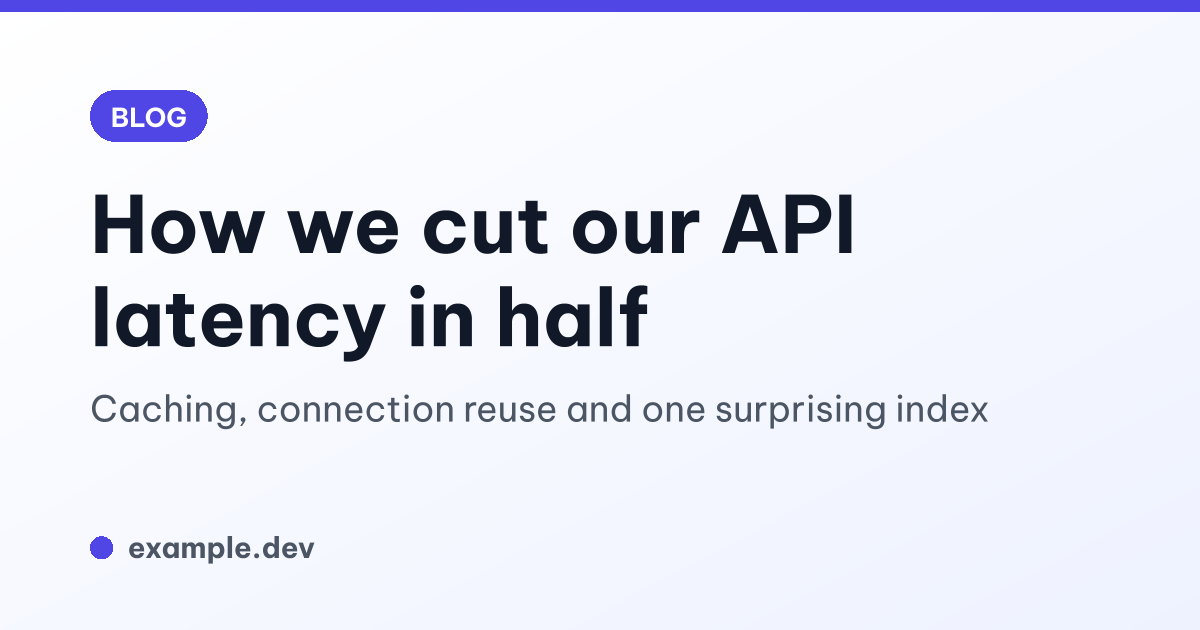
The response is the image itself: image/png, 1200×630, about 66 KB for this one. The layout puts a small tag label above the title, the subtitle below it, the site name at the bottom, and a colour band across the top. The title gets the largest font size that fits in four lines. Titles that are too long end with an ellipsis.
| Parameter | Default | Notes |
|---|---|---|
title |
– | Required, max 300 characters |
subtitle |
– | Optional second line |
tag |
– | Small label ("Blog", "New", "Release") |
site |
– | Brand line at the bottom |
theme |
light |
light, dark or brand |
size |
og |
og 1200×630, twitter 1200×675, linkedin 1200×627, square 1080×1080, story 1080×1920 |
format |
png |
png or jpeg |
align |
left |
left or center |
2. Make it look like your brand
Pick a theme, or set the colours yourself:
curl -s -G https://apibox.io.vn/v1/og-image \
  -H "Authorization: Bearer $APIBOX_KEY" \
  --data-urlencode "title=Release 2.4: offline mode" \
  --data-urlencode "site=example.dev" \
  --data-urlencode "background=0f172a" \
  --data-urlencode "background2=1e3a8a" \
  --data-urlencode "color=ffffff" \
  --data-urlencode "accent=22d3ee" \
  --data-urlencode "align=center" \
  -o release.png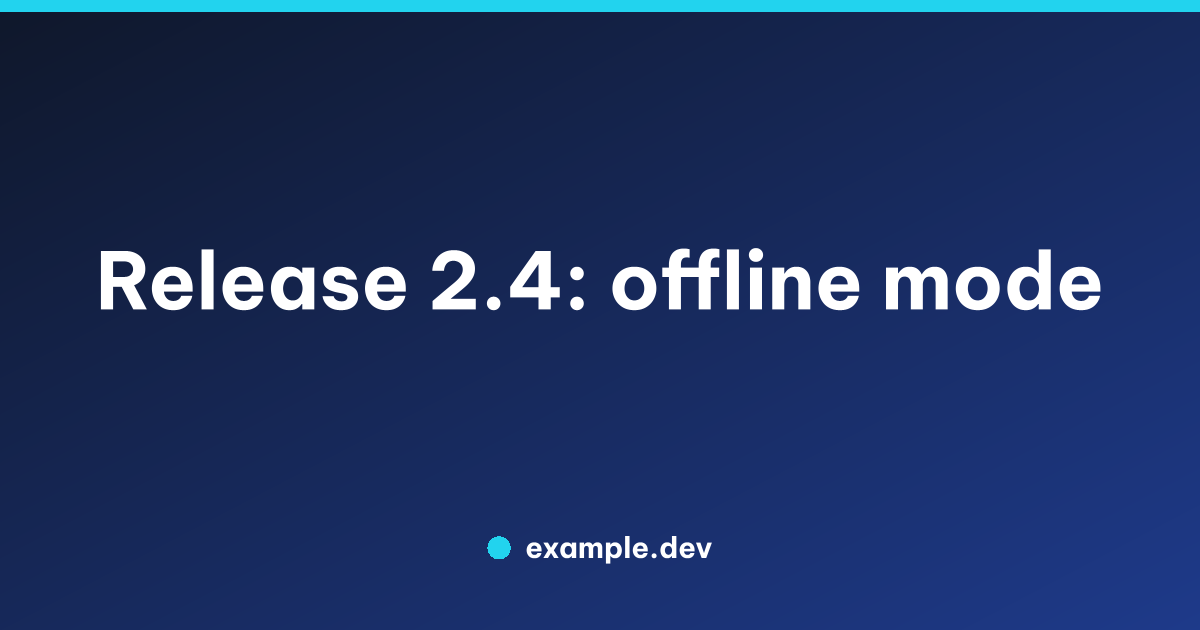
background+background2give a gradient.coloris the text colour;accentcolours the band and the tag.size=squareorsize=storygives you Instagram-style covers from the same headline.
Typography for non-English titles. Text is set in Be Vietnam Pro, a typeface designed for Vietnamese. Stacked diacritics such as ặ, ễ and ỗ land in the right place, and generic image pipelines often get them wrong. If your audience writes in Vietnamese, or you just want accented Latin text to render cleanly, that's handled for you.
The flip side: the font covers Latin scripts (including Vietnamese), not everything. When we tested a title with an emoji and a few Japanese characters, the request still returned 200, but those characters were left as blank space. Strip emoji from titles before you send them, and don't use this for CJK titles.
3. Wire it into your site without leaking the key
Here's the one thing to get right. Every call to /v1/og-image needs your API key. If you put the API URL straight into <meta property="og:image"> with api_key= in the query string, anyone who views your page source can copy the key and use your quota.
So generate the images on your side and serve them as static files. Two common patterns:
a) At build time (static sites)
For a blog built with any static generator, render one image per post during the build:
// scripts/og-images.mjs – run before or after your site build (Node 18+)
import { writeFile, mkdir } from 'node:fs/promises';

const KEY = process.env.APIBOX_KEY;
const posts = [
  { slug: 'api-latency', title: 'How we cut our API latency in half', tag: 'Blog' },
  { slug: 'offline-mode', title: 'Release 2.4: offline mode', tag: 'Release' },
];

await mkdir('public/og', { recursive: true });

for (const p of posts) {
  const params = new URLSearchParams({ title: p.title, tag: p.tag, site: 'example.dev', theme: 'dark' });
  const r = await fetch(`https://apibox.io.vn/v1/og-image?${params}`, {
    headers: { Authorization: `Bearer ${KEY}` },
  });
  if (!r.ok) throw new Error(`${p.slug}: APIBox ${r.status} ${await r.text()}`);
  await writeFile(`public/og/${p.slug}.png`, Buffer.from(await r.arrayBuffer()));
  console.log('wrote', p.slug);
}
Running it prints wrote api-latency and wrote offline-mode and leaves two 1200×630 PNGs in public/og/.
Then in each page template:
<meta property="og:image" content="https://example.dev/og/api-latency.png">
<meta property="og:image:width" content="1200">
<meta property="og:image:height" content="630">
<meta name="twitter:card" content="summary_large_image">
Skip posts whose image already exists, so each build only calls the API for new or renamed posts. A blog with 150 posts uses 150 requests once, then a handful per month.
b) On demand (dynamic pages)
For pages created by users (profiles, listings, job posts), add a small route on your server that calls the API with the key, caches the result (object storage or a CDN cache), and returns the PNG. Your og:image points at your own route, for example https://example.dev/og/listing/8841.png. The key never leaves the server, and each image is generated once.
Python: regenerate one image
import os, requests

KEY = os.environ["APIBOX_KEY"]
r = requests.get(
    "https://apibox.io.vn/v1/og-image",
    params={"title": "How we cut our API latency in half", "site": "example.dev", "theme": "brand"},
    headers={"Authorization": f"Bearer {KEY}"},
    timeout=30,
)
r.raise_for_status()
open("og.png", "wb").write(r.content)
POST is also accepted, with the same fields in a JSON body.
Limits to know
- No logo or custom image yet. The layout is text, colours and a band. Use
siteandaccentas your brand line. - PNG or JPEG only. Social networks don't accept SVG for previews.
- No emoji, no CJK. Characters the font doesn't have come out blank, with no error. Latin scripts, Vietnamese included, render fine.
- One layout family. Themes and colours change the look, not the structure. If you need a fully custom design (photos, charts, avatars), an HTML-to-image approach gives more freedom at the cost of running it.
- Quota. One image is one request. Free gives 1,000 a month and 30 per minute. Generate once and cache, as above.
Other ways to do this
You can render OG images inside your framework with an image-generation function. You can screenshot an HTML template with a headless browser, or use an image CDN's text overlays. Other hosted generators work much like this one. Framework functions are a good fit if you already deploy on that platform. Headless rendering gives total design control. A plain HTTP API fits when you want the same images from any stack (a static site, a PHP app, a no-code tool) with nothing to host.
Test your previews
After deploying, check how the card looks before you share. Most networks have a preview or debug tool. APIBox also has a URL Metadata API that reads back the og:* tags of a page, handy in CI to assert every page has an og:image.
FAQ
Can I put the API URL directly in my og:image tag?
Only if you are fine with exposing your API key in the page source, which we don't recommend. Generate the images at build time or behind your own route, and serve them from your domain.
What size should an OG image be?
1200×630 (size=og, the default) works for Facebook, LinkedIn, Slack and most chat apps. Use size=twitter (1200×675) if you want an exact fit for X's large card.
How long can the title be? Up to 300 characters, but short titles look better. The API fits up to four lines and adds an ellipsis after that.
Can I add my logo? Not yet. Use the site name and accent colour.
Get started
👉 Get a free API key – 1,000 requests a month, no card required.
Full parameters: OG Image API docs.
More articles
- URL Metadata API: Build Link Previews From Any URL
Get title, description, og:image, favicon, canonical, Twitter Card and JSON-LD of any URL as JSON. Build link previews in minutes. curl, JS, Python. - API Ninjas Holidays Alternative for Vietnam (+ Lunar)
Need Vietnam holidays beyond a date list? Compare API Ninjas Holidays with APIBox: Tết break, make-up days, 2027, lunar dates. Migration code included. - HTML to Markdown API: Clean Markdown From Any Web Page
Convert HTML or any URL to clean GitHub-flavored Markdown with one API call: tables, absolute links, Readability article extraction. curl, JS, Python. - IP Geolocation and User Agent Parsing in One API Key
Look up country, city, ASN and ISP for any IPv4/IPv6 address, parse User-Agent strings into browser, OS and device, and detect bots. curl + JS.